Contract compliance console
A specialist recruitment firm places contract professionals into fintech and regulated financial services. Challenger banks, asset managers, payments infrastructure, proprietary trading firms. The work is compliance heavy by nature. Every contractor placed in a regulated firm needs an FCA Fitness and Propriety check, a right to work verification, a regulatory reference from their previous employer, and in many cases an IR35 determination before they start.
When we arrived, all of that was tracked in a spreadsheet one consultant owned. Renewals were managed by memory. Invoices lived in a separate system. The picture of what was live, what was expiring and what was already overdue existed only in someone’s head, and partly in a file that needed that person at their desk to open.
This is the story of what changed, and why a compliance incident was the thing that finally forced it. Below: the situation, the gap the regulator found, what we built, and what the firm can see now that it could not see before.
The situation
The firm manages contracts across a small client base. A handful of regulated firms, each with several active placements running at once. At any given time there are dozens of live contracts, each with its own compliance document set, its own renewal date, and its own invoice schedule.
Three systems, none of them talking
Contract status lived in a spreadsheet. Compliance documents lived in a SharePoint folder. Invoices were raised by hand and tracked in Xero. The relationship between the three lived in a consultant’s head. Which placement was in which system, which documents were expiring, which contract was coming up for renewal, none of it was visible in one place. Getting a full picture of a single contractor meant opening three things and lining them up by hand.
On a quiet week, that worked. The consultants knew their contractors and kept track. On a busy week, or when someone was on leave, the picture went stale. Documents expired without triggering a chase. Renewals reached their end date without a call being made. The process worked until it did not, and it did not in a way that was hard to see coming.
The compliance gap the regulator found first
One of the firm’s contractors held a CF10a designation, a controlled function under the FCA Senior Managers and Certification Regime, specifically the Compliance Oversight function, at a regulated client. CF10a holders have to keep a current FCA Fitness and Propriety check as a condition of the designation.
Her Fitness and Propriety check had expired. The placement was still active. The expiry had not triggered an alert, because the spreadsheet did not generate alerts. Nobody had noticed, because nobody had a view that would have shown them. The FCA found it during a routine review of the client firm, not during an internal check.
The FCA did not penalise the recruitment firm directly. But it flagged the gap to the client, the client flagged it urgently, and the placement had to be suspended while the check was renewed. The firm had been carrying a regulatory exposure it could not see, in a contract it had placed.
The incident lasted about a week. The question it raised, how many other expirations are sitting in the spreadsheet right now, was the brief for the build.
What we built
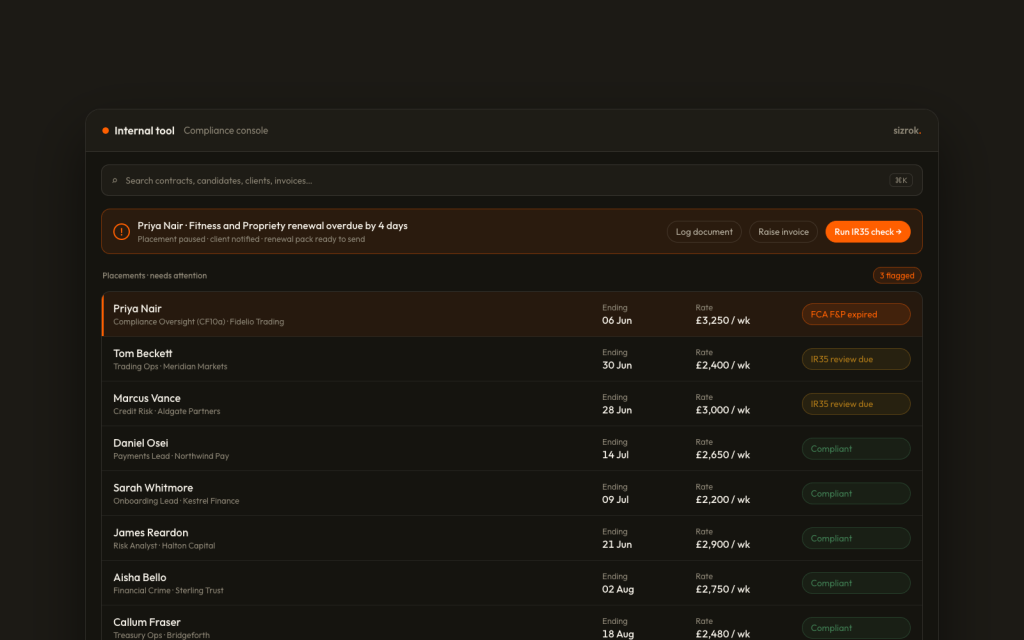
We built a contract operations console. One internal tool that holds the live picture of every placement, every compliance document, every renewal and every outstanding invoice in one place, with automatic flags for anything about to become a problem.
It does not replace the systems the firm already runs on. Xero still raises the invoices, the documents still live in SharePoint, the alerts land in the team’s Microsoft Teams. The console sits across all of it and gives the one thing none of them gave on their own. A single view, kept current, of what needs attention today.
The four things it surfaces
Active contracts shows every live placement with its status, the consultant who owns it, the client, the IR35 determination, the day rate and the contract end date. At a glance the team can see what is active, what is ending within the month, and what has already run past its end date.
Compliance status is tracked per contractor, per document type, with an indicator that changes colour as a deadline approaches. FCA Fitness and Propriety checks, regulatory references, right to work documents, CISI certificates, AML training, IR35 determinations. Every document type the firm requires has an expiry date tracked and a days remaining figure visible without opening anything else. When a document expires or nears expiry, it surfaces in a needs attention panel at the top of the console, named and dated.
Renewal pipeline shows every contract ending within sixty days, with the last contact logged, the weekly value at risk, and a flag for whether a renewal has been offered, confirmed, or not yet contacted. A contract ending in six days with no renewal contact logged looks different from one where the extension is already agreed. The team does not hear from the client that a contract ended. They see in the console that it was about to.
Invoice management tracks every invoice by placement and period, with sent, paid and overdue status, and outstanding amounts by client. An overdue invoice surfaces in the same attention panel as a compliance expiry. Xero still handles the payments. The console adds the visibility that was missing.
Automated notifications
The console raises a notification for anything time sensitive. A compliance document expiring within thirty days, a contract ending within a week with no renewal contact logged, an invoice overdue by more than fourteen days. These land in Microsoft Teams, where the team already works, rather than waiting for someone to open the console and look. The console does not send emails on the firm’s behalf. It tells the right person something needs doing, and logs when it was acknowledged.
How the daily picture works
Before the console, the morning started with opening the spreadsheet and trying to remember what had changed since the day before. Now it starts with the needs attention panel, which surfaces only what needs action that day. A consultant at their desk sees which documents are nearing expiry, which contracts need a renewal call, and which invoices are overdue, ranked by urgency. Everything else is visible but not demanding.
Nothing expires without a lead time
The console is built around one principle. Nothing should expire without being surfaced to a human with enough time to act. The thirty day window for compliance documents and the sixty day window for renewals were both set from the firm’s actual lead times for getting documents renewed and renewal conversations done. The numbers are theirs, not defaults.
A compliance failure visible only in a spreadsheet is not compliance tracking. It is record keeping with no early warning system.
What changed
The immediate change was visibility. The morning after the console went live, the team ran a full audit of compliance status across every active placement for the first time in the firm’s history. Several documents were within thirty days of expiry that had not been on anyone’s radar. None as acute as the CF10a incident, but all of them gaps the console surfaced and the spreadsheet had not.
The second change was confidence. Placing a contractor in a CF designated role now starts with a compliance check in the console rather than a mental review of a spreadsheet. The team can see, before a placement is confirmed, whether every required document is current and for how long.
The renewal pipeline runs differently now
Before, a renewal conversation happened when a consultant remembered it, or when the client raised it. Now the renewal pipeline shows every contract ending within sixty days, sorted by urgency, with the value at risk in view. A contract worth three thousand pounds a week, ending in six days with no renewal contact logged, does not slip past. It sits in the panel, in red, until someone acts on it.
The firm has not lost a renewal to oversight since the console went live. That is a small number of renewals in a short period, and the claim should be read as what it is. An early signal, not a proof. The console will prove itself over time, in contracts that do not lapse for no reason.
Where it goes next
The console is owned by the firm. The code, the configuration and the credentials were transferred on the day it went live. The team can add a document type, change the expiry thresholds, or change the notification rules without us in the room.
The natural extensions are straightforward. Automatic chase emails when an expiry is within fourteen days, a client facing portal showing the compliance status of their placements, and a simple view of consultant performance across the renewal pipeline. None of that needs building now. The console does its current job, the team trusts what it shows them, and the next steps happen when the firm is ready.
What mattered most was closing the gap between what the spreadsheet knew and what the firm could act on. That gap is closed. The regulator will not be the one to find the next expiry.

Ask the business
A professional services firm with a management team of six had more data than it could use. The data was not missing.…

Inbound receptionist
An independent dental group with three city locations came to us with a version of the same problem every multi site practice…